Advanced Menu Organizer
This is an application that let you easily organizing your phone menus. It can move application/game icon from one folder to another folder and more.
Advanced Menu Organizer 1.0
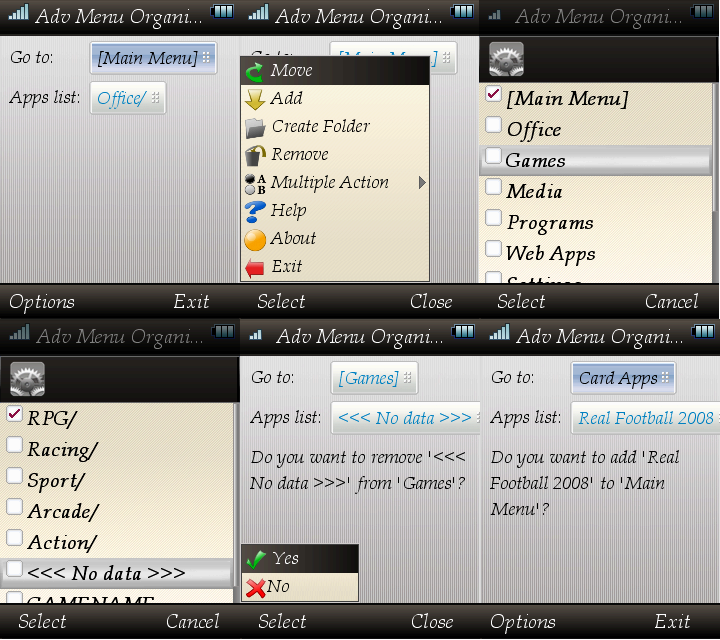
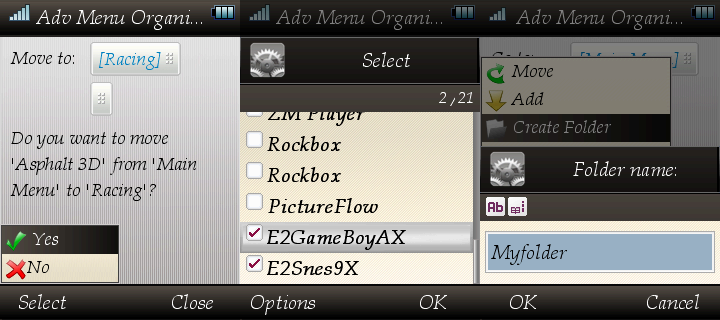
Features:
- Move selected application/game icon from folder to folder.
- Add installed application/game icon.
- Remove application/game icon from your menu.
- Multiple select for move, add and remove.
- Create folder on your menu.
Usage:
Here is a little FAQ on how to use this application.
Q: I have installed the application but it shows error "Not run as root", what should I do?
A: You need to give root permission for this application first, you can use PhoneWare Manager that is usually included on any new MP.
Q: How can I move my game to games folder?
A: Go to where your game on using the "go to" box, then click the "app list" box and select the game you want to move. After this, click on Options -> Move, you will get confirmation text on the screen, ignore it and use the "go to" box to where you want to place this game. And finally, click on Options -> Yes.
Q: Ok, now I know how to move, but what is the add and remove does?
A: Add is to add application/game that has been installed, on SD, phone or system. This may be useful when the application/game icon is gone from your menu but not uninstalled. While remove is doing the opposite, it remove the application/game icon from your menu. This will useful when you got double icon refer to the same application/game or maybe you want to hide this application/game. :P
Q: So the remove function will uninstall application/game?
A: No, it just remove the icon from your menu.
Q: Why do I have "<<< No data >>>" in my app list?
A: This happens when we can't get the information for this application/game. This might caused by unclean uninstallation of application/game. You can safely remove this if you found any.
Q: Can I move multiple applications/games at once?
A: Yes, you can, use Options -> Multiple Action and select what do you want to do.
Q: I found a bug, what should I do?
A: Then report me on forum, email or IM. :)